Docs
AI visibility API quickstart
Mint a key, confirm it, make a real request. Five minutes end to end, and nothing to install unless you want the CLI.
Card required, nothing charged for 7 days
Before you start
You need an AIMentionTracker account with at least one brand configured and collecting, and the Owner or Admin role, because those are the only roles that may mint a key.
The API reads what has already been collected. It does not trigger collection, so a brand that finished onboarding an hour ago will have fewer answers than a rate can be quoted from. See how to read our numbers.
Four steps
- 1
Mint a key
Go to API keys in the app and create one. It starts
amt_live_and is shown once. Copy it somewhere safe before you close the dialog. - 2
Put it in the environment
Never in source control, never in front-end code. It reads every brand the key covers.
- 3
Confirm it with /me
One request that proves the key works and tells you the rules in force.
- 4
Ask a real question
Per-engine visibility over a window you choose, or the answers behind it.
Step 1 and 2: the key
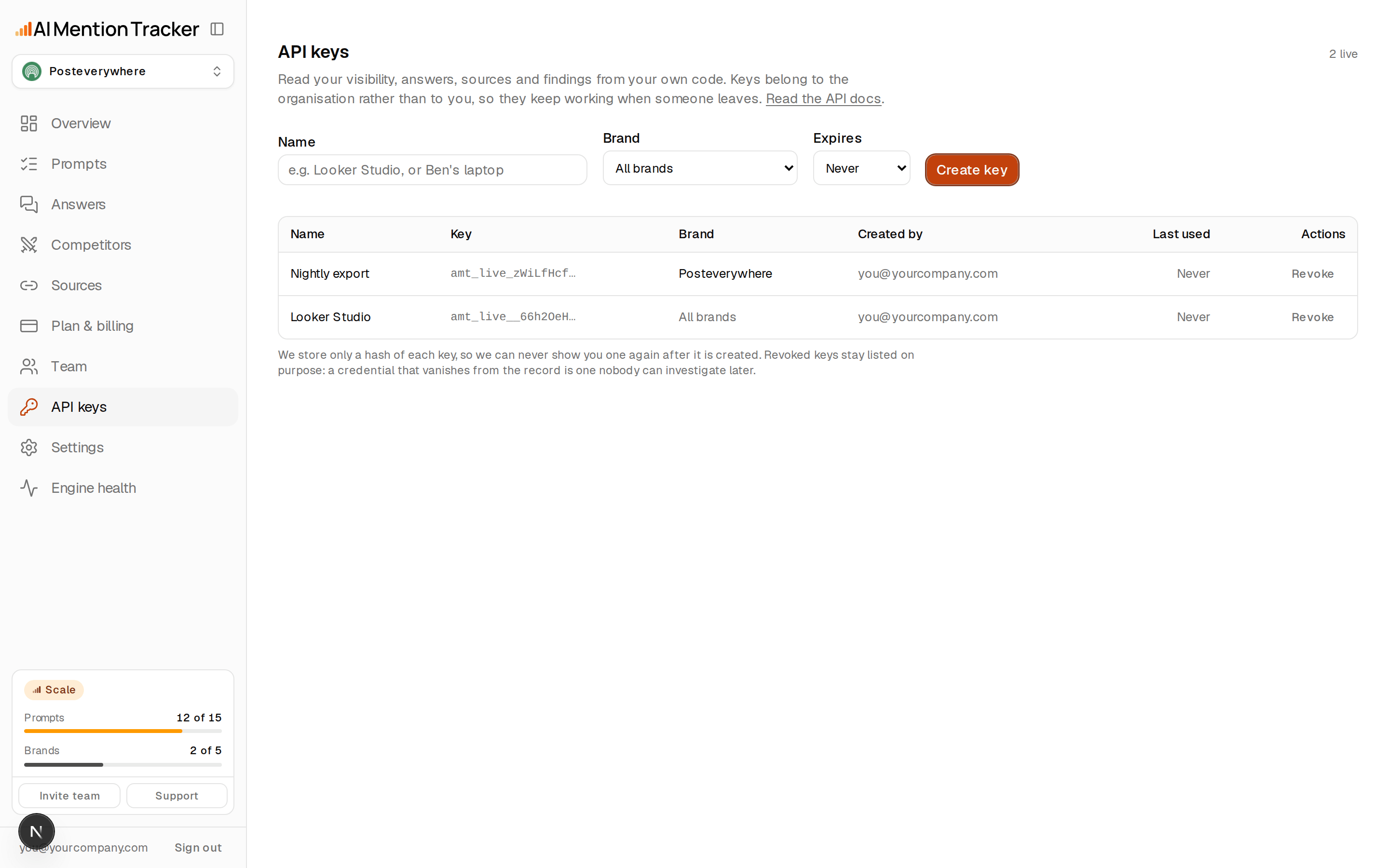
export AMT_API_KEY=amt_live_...Keys belong to the organisation, not to you. They survive the person who made them leaving, and a request is not re-checked against that person's role — demoting an admin must not take production down at 3am. Revoke a key when someone leaves; deleting the user does not.
Step 3: confirm the key with /me
curl -H "X-API-Key: $AMT_API_KEY" \
  https://app.aimentiontracker.ai/api/v1/me
A 200 means the key is good. The response carries your plan, how many prompts it includes, whether the key is pinned to a single brand, your current rate-limit position, and a reporting_rules block with the live thresholds. Read those rather than hardcoding 5: if we change the floor, your client should follow without a release.
Anything else means something specific. The full list is on errors and rate limits.
Step 4: your first real request
Start with visibility over the last 30 days. If your organisation has one brand, this is all it takes.
curl -H "X-API-Key: $AMT_API_KEY" \
  "https://app.aimentiontracker.ai/api/v1/visibility?days=30"
If you have more than one brand you will get 400 brand_required. That is the API refusing to guess. Call /brands, take the id, pass it on every request after that. Full detail on working with multiple brands.
curl -H "X-API-Key: $AMT_API_KEY" \
  "https://app.aimentiontracker.ai/api/v1/brands"

curl -H "X-API-Key: $AMT_API_KEY" \
  "https://app.aimentiontracker.ai/api/v1/visibility?days=30&brand=<id>"
Before you render any of it
Three rules you must not break
These are not style preferences. Breaking them produces a confidently wrong report in your customer's name.
- 1
A null rate means "not enough answers yet". It is NOT zero.
Rates come back as {present, responses, rate, min_sample}. When rate is null, the sample is below the floor. Say “3 of 4 answers, too few to quote a percentage”. Never render it as 0%, and never let it into an average. Reporting “0% visibility” for a brand that was named in 3 of 4 answers is the single most damaging thing you can do with this data.
- 2
Never average the engines.
There is no single visibility score and you must not compute one. ChatGPT, Perplexity and Google AI Overviews are different surfaces that disagree, so a mean describes nothing real. Report per engine. If the user insists on one number, give them the pooled counts (present and responses summed) and say plainly what you did.
- 3
An empty alerts list does NOT mean nothing changed.
A finding is raised only when both comparison windows carry enough answers AND the move is larger than its own margin of error. On a small plan that excludes most real movement. Say “no change large enough to distinguish from noise at this sample size”. GET /me shows the thresholds in force.
If you would rather not write HTTP
The CLI does the same thing from a terminal or a CI job, with no code at all.
npx @aimentiontracker/cli whoami
npx @aimentiontracker/cli visibility --days 30
And if you are working inside an AI assistant, the MCP server gives it the same six reads as tools, with no install and no key handling in the conversation.
Quickstart questions
Answered from the implementation.
Where do I get an AIMentionTracker API key?
Should I call /me first?
Why did my request return 400 brand_required?
Can I use the API key in a browser?
Do I need an SDK?
7-day trial
You need data before you can read it
The API returns what has already been collected. Add your brand and the prompts your buyers type, and the first answers land within minutes.
Card required, nothing charged for 7 days.
On every plan
- Every answer stored in full, with its citations.
- Every rate shown with the number of checks behind it.
- Cited-but-not-named reported as its own state.